

Learn How to Coupon at Walmart, Target, CVS and More! Learn how to extreme coupon & start couponing, stacking coupons, organizing coupons and more!
 Have you ever wanted to learn how to coupon, but you get overwhelmed before you start and give up? Maybe you’re tired of Spending too much on groceries each month and you want to learn how to coupon even with a busy lifestyle. You’re in luck! This Beginners Guide to couponing is the perfect place to start! I hear from so many of you that you are overwhelmed and not sure where to start so I’m going to teach you how to extreme coupon the Easy Way!
I’ll walk you through each step in how to coupon so you can understand the lingo, where to find coupons, how to stack coupons and so much more!
Learn How to Coupon:
Here’s a quick round up of all the topics covered in this post, click the links below to jump to the topic that interests you the most!
- How to Use Coupons
- How to Extreme Coupon
- How to Find Coupons
- How to Stack Coupons
- How to Organize Coupons
- The Best Stores for Couponing
- The Best Coupon Apps
- How to Get Sunday Coupon Inserts for Free
- How to Use Digital Coupons
- How to Get Coupons in the Mail
- How do Double Coupons Work
- How to Understand Coupon Lingo

BONUS: Take our FREE 15 Minute Online Coupon Class and learn how to save money, use coupons, and get amazing deals at the grocery stores and drugstores! This video will walk you through all the basics of using coupons and getting started, plus you’ll get daily updates with all the best coupons and deals we’ve posted here on Passion For Savings!
How to Coupon – Quick Start Guide
Are you New to Couponing? I want to make it easy for you to learn how to coupon so I’m going to break down the steps to start couponing so you can be on your way, I’ll also include a lot more detailed information on how to coupon below if you want to check that out for more details!
- Step 1: Find Coupons – The easiest way to find coupons is to look in your local newspaper on Sunday’s, or to visit our Print Coupons online! We have a page with hundreds of dollars in savings, I’d recommend starting with Printable Coupons because they require a lot less organization and you only have to print the coupons for the items you plan to buy!
- Step 2: Look for Sales – The next step is to find out what’s on sale this week, or look for sales in your local stores for the items you have coupons for. Any time you can use a coupon on an item that’s already on sale you are getting double the savings!
- Step 3: Buy Multiples when you find a good deal! – This is one of the best tips that comes from the Extreme Couponing area. When you find a good deal, don’t buy just one, buy multiples of that item. That way you will have enough to last you till the next sale and you won’t be paying full price the next time you need the item.
- Step 4: Only Buy Items You Will Use! – So many people fall into the trap of buying something just because it’s on sale or a “good deal” in reality you’re spending money you don’t need to spend so if you wont use an item it’s actually costing you money, not saving money. I recommend starting with items you use on a weekly basis, that’s where you’ll see the biggest savings.

How to Use Coupons
When you first start out it can be a little overwelming to figure out how to use coupons. Luckily it’s really easy to use coupons at most stores. You simply take the coupon to the checkout with your item and hand the coupon to the cashier, they will scan your item first, then the barcode on your coupon second. The amount of the coupon should be deducted from your purchase total at checkout which saves you money!
4 Important Tips for Using Coupons:
How Many Coupons Can You Use?
Typically you can use one coupon per item. Look for the wording on the coupon to understand exactly how many items the coupon applies to. If it says $1 off ONE Item then you can use one coupon for every item you purchase. If a coupon says $1 off TWO items, then you can only use one coupon for every 2 Items.
Pay Attention to Coupon Limits:
Most coupons have limits on them, this will be listed in the fine print of your coupon so it’s important that you read the fine print. Typically coupons are limited to 2 per person, per household per day, or 4 per transaction. If you do not see a limit on the individual coupon then you will want to refer to the store coupon policy for store limits.
Read Your Stores Coupon Policy:
It’s important to make sure you read and understand your stores coupon policy. Every store has a different policy as to how many coupons they will take, if they double coupons and how coupons are applied. I recommend starting with just one store until you become familiar with the coupon policy at that store, then move on to a second store, that will help to keep you from getting overwhelmed or confused.
What does 1 Per Purchase Mean?
Almost all coupons say “Limit 1 coupon per purchase” in the fine print. This can cause a lot of confusion at checkout because some cashiers will tell you that you can only use one coupon per transaction when this actually means that if you “Purchase” 2 items, you can use 2 coupons.

10 Strategies for Beginning Couponers:
Here’s a step by step system for how to coupon at any store. I recommend picking one store and starting small. You’ll be surprised how fast it starts to make sense and you’ll be more confident at other stores once you’ve conquered one store in the beginning!
PRO TIP: If you are new to using coupons make sure you Request to join our Coupon Club on Facebook, this is a group where we share hot deals and help you learn how to use Coupons!
1 – Start Small!
Using coupons can be overwhelming, Don’t try to start with an entire Grocery List, that can be really frustrating and overwhelming all at the same time. When I started couponing it was by default, I did a few deals here and there and slowly I was hooked. Because I started small I had the chance to learn the processes without being overwhelmed.
If You are new to using Coupons I recommend starting with 2-3 deals at a time in a transaction. Don’t try to buy 15 items all at once, you’ll get lost, something will mess up and you’ll leave more frustrated than when you started! Pick your favorite 2 or 3 deals the first few weeks and just accomplish those. It will give you the time to really understand how each deal works without spending hours and hours clipping coupons!
2 – Pick One Store!
This is super important because not all stores are created equal, I recommend starting with Target or CVS if you have one in your area. Publix and Kroger are also great Grocery Stores if you have those in your area. Pick the store you have near you and focus on doing the deals at that store each week, when you start to be confident then slowly add on other stores. I started with Walgreens because that was all we had, once I had tackled Walgreens it was easier to move onto Target, Walmart, CVS, etc.
3 – Only use Printable Coupons!
Yes, you can get fantastic coupons in the newspapers, but keeping up with all those coupons, keeping them organized (um, cleaned out) can be time consuming and my guess is you will spend more time clipping and cutting than you will saving. Printable coupons are a great way to save money without all the time investment.
You can see HUNDREDS of Printable Coupons on our Coupon Page Here.
4 – Let Someone Else do the Hard Work!
While there are HUNDREDS of Coupons and sales out there every week, we pride ourselves on helping you find THE BEST deals, We will let you know when there are new coupons out there + Match them up with the hottest sales, seriously we make it SO EASY for you to get started! At the top of the site there’s a Drop Down that says “Stores” You can pick the store where you shop to see all the best deals happening this week. If you start with stores like CVS or Target we have TONS of deals for those stores so it should be easy to find great deals each week.
HOT TIP: If you are primarily using a Mobile Phone make sure you Download the Passion For Savings App. It’s an easy way to access all the deals in one spot + You’ll get alerts when Hot Deals are posted so you won’t miss anything.
5 – Always Shop with a List!
I know this seems basic but most people don’t go in the store with a list and when you are couponing it makes it SO MUCH Easier. I like to have a list of items I need + the Coupons I’m using to get that deal and the final price. It helps me double check things as I’m going through the store so I don’t get home and realize I missed something. I also like to pull my coupons to the front of my Coupon Box as I shop and add items to my cart, so when I get to the Checkout I am ready to go.
6 – Do Small Transactions!
This is something most people don’t think about. But you can break a lot of items into smaller transactions and it is less confusing for most people. It also allows you to “Roll” Your rewards or spend the rewards you earn so that you don’t have to worry about them expiring. I suggest doing 2 transactions because it allows you to spend what you earn on the first transaction on the second transaction. This is also a great way to keep your out of pocket expense lower because you wont end up with $40 in Gift Cards or Rewards that are about to expire.
One word of Caution, if you are planning on starting at Walgreens – Read this First! Register Rewards have a few limitations. At Target and CVS there are no rules about spending Gift Cards and ECBs which is why those stores are great for beginners!
7 – Be Consistent!
The tendency is to Run Out and grab All the deals in one week or to try to build a stockpile like you see on TV all in one week. You really don’t need 20 bottles of Laundry Detergent at one time, the key to successful couponing is being consistent in grabbing the good deals each week. I rarely buy more than 4 of anything, unless it’s just way lower than my stock up price. If I buy 4 bottles of Laundry Detergent, that’s plenty to last me through to the next sale. I don’t need any more than that, a Stockpile happens overtime so don’t stress if you don’t have everything in the first 2 or 3 weeks just stick with it over a year the deals come and go on just about every item and you’ll be able to grab everything you need! Then once you have a good stockpile it’s more about maintaining what you are using than accumulating piles of stuff!
8 – Work with a Friend!
It’s always great to have friends cheering you on! If you are new to couponing and you don’t have a “community” of friends locally to help you out, or even if you do and you just want a little more support make sure you Check out our New Coupon Club on Facebook! I’d love to have you join. If you have a friend locally that’s also wanting to save money, work together, you don’t have to shop together (Although that’s a ton of fun) But you can text each other about great deals you find locally, Share Blog Posts with each other and encourage each other when you score an Awesome Deal or get Frustrated. Everything is better with Friends and having an Accountability Partner will help you stick with your goals until it becomes second nature.
9 – Only Shop Once a Week!
It’s SOOOOO Tempting to run to the store for Just One Deal only to find out that deal is out of stock, or to spend a lot of time running from store to store to only grab one item each place. I know because I have been there, I have completely burned out on using coupons because I was wearing myself out making sure I didn’t miss a deal. Now I only shop once a week and while I might miss some sales, I make sure I am watching the deals every day (By Checking the App, or the Facebook Page) And printing coupons as they come up. Then I make a list and shop once a week, I hit all my favorite stores at once and I typically get almost everything I wanted or needed.
10 – Download These 3 Rebate Apps
In addition to using coupons Using Rebate Apps is a really SIMPLE and Low Stress Way to Save, All you have to do is Download these Apps to your smart phone, Create an Account and then you’ll be able to view hundreds of rebates. These change each week and all you have to do is Buy the Product, then Scan your Receipt into the app and submit for Cash Back! You’ll get Cash Back added to your account it’s really simple and the best part is you can submit for rebates in addition to coupon and sale savings for some fantastic deals.
Here are my Top 3 Rebate Apps that I like to use:
These are just a FEW of the many ways that you can make couponing fit into even a busy lifestyle. If you are still wanting to save even more I recommend signing up for our FREE 15 Minute Online Coupon Class.

How to Coupon Like Extreme Couponing Pros!
Extreme Couponing became popular in 2011 with the launch of the Popular TLC TV Show. One of the most popular questions I get asked is about How to Extreme Coupon and what’s the difference between that and regular couponing?
Extreme Couponing involves stacking store sales with coupons and buying “extreme” quantities of the same item to get maximum savings! In reality Extreme Couponing isn’t very different from regular couponing, it’s just taken to the “Extreme” level and it probably isn’t realistic or necessary for most people. If you learn how to coupon effectively you’ll be an extreme couponing pro without even realizing it!
Extreme Couponing Strategies of the Pros can also be helpful to Beginners, so while I don’t think everyone has to be extreme, I do think these Extreme Coupon Strategies are good to know and keep in mind while you’re shopping!
7 Extreme Couponing Strategies of the Pros:
Always Stack Coupons with Sales:
The best time to use your coupons is when an item is on sale. That often means waiting to use your coupons so being organized is important! You will save a lot more if you use your coupon when an item is on sale vs. just walking into the store and buying an item at the retail price. This is what makes the couponing EXTREME, You’re stacking sales and coupons to get the Bigger Savings!
Use Multiple Coupons on an Item:
This is what is known as “Stacking Coupons” Most stores allow you to use one store coupon and one manufacturer coupon per item. Stacking 2 coupons together gives you double the savings.
Buy Smaller Items in Bigger Quantities:
A $1 coupon is a higher % of savings on a smaller item than it is on a larger item. So when it comes to Extreme Couponing buying in bulk isn’t always cheaper. Extreme Couponers often buy a lot of a smaller item using coupons, rather than buying in bulk.
Shop Multiple Stores:
Extreme Couponers only buy what’s on sale, they shop the best deals at multiple stores each week. This concept of shoping the loss leaders allows you to get the biggest savings on what you need. Rather than walking into one store and buying all the items you need in one place, an Extreme Couponer will shop around and get the best deal on each item by hitting multiple stores in the same week.
Take Advantage of Store Rewards:
Most Grocery Stores and Drugstores have loyalty cards or programs. Often times you pay a lower price when they scan in your loyalty card, and you can also earn Rewards at checkout for buying specific items. You will find these rewards advertised in the local flyers, pay attention to these rewards because often times when you combine Sale Prices + Coupons + Rewards you can even get items for FREE!!!
Use Rebate Apps to Save Even More:
Rebate Apps are one of the most popular ways to save right now! The best thing about Rebate Apps is that you can typically use them in ADDITION to using coupons! So it’s extra savings! 2 of the most popular Rebate Apps are Ibotta & Checkout51! Both are free to join and have new rebates available each week!
Follow Sales Cycles:
Extreme Couponers know when the best time of the year is to buy each type of item. Think of this as “Buying in season” Items like Soft Drinks and Frozen Pizzas are on sale during the Super Bowl and March Madness, Burgers, Hot Dogs, Condiments, Paper Plates and BBQ Items are on sale during Summer Months, and Baking Supplies are on sale during the Holidays. Knowing when these items are at their lowest price point and stocking up when they are on sale are a big piece of Extreme Couponing.
How to Find Coupons
There are several different types of coupons including Printable Coupons and Newspaper Insert Coupons. You can find coupons online by searching a companies website, or look on our Printable Coupons Page for recent deals we’ve posted, we always include links to the coupon source so that you can find the coupons easily and print them out. Newspaper coupons are located in the Sunday Newspaper each week and can be a little bit trickier. Here are a few tips on How to Find Coupons Online and in the Sunday Paper!
How to Find Online Coupons
Finding online coupons is all about knowing where to look, there are several great sources like the Coupon Database that list out all the coupons available by product or brand, but it’s also a good idea to follow sites that help you keep up with the latest printable coupons available online.
I highly recommend checking out the Printable Coupons page here on Passion For Savings on a daily basis. I’m always adding new coupons daily sometimes every hour as I come across high value coupons so this is a great place to check frequently if you only have a few minutes each day to keep up with the best coupons.
I also thought it would be good to list out some of the top sources for online coupons:
- Coupons.com – This is my #1 Site for Online Printable Coupons. You can find new coupons issued daily and one tip to keep in mind, the First Day of the month is when all the coupons reset and we often see a huge number of new coupons so check back on the first of the month for even more savings!
- Coupon Network – This site is run by the Catalina company and there are 2 different types of offers, you’ll find Printable Coupons as well as Offers valid at Grocery Stores across the nation for “Your Bucks” Which print at Checkout and are good on your next in store purchase
- Smartsource – While this site isn’t refreshed with new coupons as frequently you can often find some great high value coupons here. Smartsource coupons also don’t reach their print limits very fast so this is also a great source for second copies of the coupons on Coupons.com
- RedPlum – New coupons are released on Sundays and often the RedPlum.com Coupons are similar to the coupons released in the Newspaper Insert.
- MamboSprouts.com – You can print Organic and All Natural Coupons from this website to use at your local grocery stores or Whole Foods!
How to Print Online Coupons
When you first start printing online coupons you will have to make sure you download and install the printer driver for each of the coupon sites, this is tracking software that ensures that you don’t print more than 2 copies of each coupon, it also encodes each online printable coupon with your unique computer id so that stores can tell if your coupons are unique or duplicated or copied. It’s a good idea to turn off your popup blockers before trying to print from each of these sites for the first time.
How to Find Newspaper Insert Coupons
Within your local Sunday Newspaper you will find several different inserts containing coupons. There are 3 main types of Coupon Inserts that I wanted to cover since these are the ones I reference the most in my store matchups and also in the Coupon Database.
The SmartSource Insert is abbreviated SS and is typically a weekly insert. In a Matchup you will see the abbreviation (SS 10/17/10) This means that the coupon was located in the SmartSource Insert from the October 17th, 2010 Newspaper. I always save my inserts by the date they were in the newspaper to make it easier to go back and find the ones I need.
The RedPlum Insert is abbreviated RP and may also be referred to as the Valassis insert depending on what part of the Nation you live in. This is the other main company that does Newspaper inserts and typically you can find some of the same coupons available on RedPlum.com – This newspaper insert is not available in all areas to find out which Newspaper carries the Red Plum Insert in your area you can Check out this Locator Tool at RedPlum.com.
The Proctor & Gamble Insert is abbreviated PG and typically is included in the newspaper around the first of each month. This insert offers high value coupons for products such as Gillette, Old Spice, Herbal Essence, Swiffer, Febreze and More.
One of the most common questions I get is in regards to the abbreviations used in my weekly store matchups. I will try to cover this in depth in the near future but here’s a crash course in understanding Matchups.
Here is what my typical Matchup looks like:
Lipton Soup Secrets, $1.18
$0.75/2 Lipton Soup Secrets, exp. 2-27 (RP 01/30/18) <— NEWSPAPER COUPON
$0.80 ea. wyb 2 after coupon!The Coupon listed is from the newspaper and the most important part is listed at the end. This is what tells you how to quickly find the coupon.
The First 2 letters of the section in parenthesis tells you which insert the coupon was located in.
SS = SmartSource Insert
RP = RedPlum Insert
PG = Proctor & Gamble Insert
GM = General Mills InsertFollowing the Abbreviation for the Insert is the Date the coupon was in the newspaper. So if the date is 01/30/18 that means that this specific coupon for Lipton Soup was in the newspaper on January 30, 2018.
You can search the Coupon Database Here to find coupons for items you are looking for, then use the information above to locate the newspaper insert coupons quickly!
How to Stack Coupons
There are 2 Types of Store Coupons and it’s important to understand the differences. Basically there are Coupons used on SINGLE ITEMS and Coupons for your TOTAL TRANSACTION.
A Single Item Coupon is for example a coupon that says Save $0.25 on Palmolive. That coupon can be stacked with another $0.25 on Palmolive Manufacturer Coupon for a total of $0.50 in Savings off that one item!
Stacking Store Coupons with Manufacturer Coupons
You can stack Store Coupons and Manufacturer Coupons at most stores. It’s important to know the differences between the 2 types of coupons so make sure you read this post with Facts & Questions if you need more help understanding that part of the process. One of the things to keep in mind is that Single Item Coupons are often Advertised in the weekly ads, this will show you if there are any coupons or offers valid with the store coupon.
Total Transaction Coupons are often not advertised with additional savings so keep your eyes open for these. If you see a total transaction coupon the key is to Look Around and see what other sales you can combine the coupon with.
At Target we often see gift card deals that can be stacked with Total Transaction Coupons (Like a Spend $50 save $10 Target Coupon) Or at CVS there are often $5/$15 Makeup Coupons that stack with ECB Deals!
You can combine One Manufacturer Coupon + 1 Store Coupon per item typically with Single Item Coupons. Total Purchase Coupons I like to combine with all the best deals that week for big savings!

How to Organize Coupons
I want to cover several methods for Organizing Coupons. I’m going to start with one of the most popular methods which would be the Binder System. To Create a Coupon Binder you would need the following items most of which you probably have around your house:
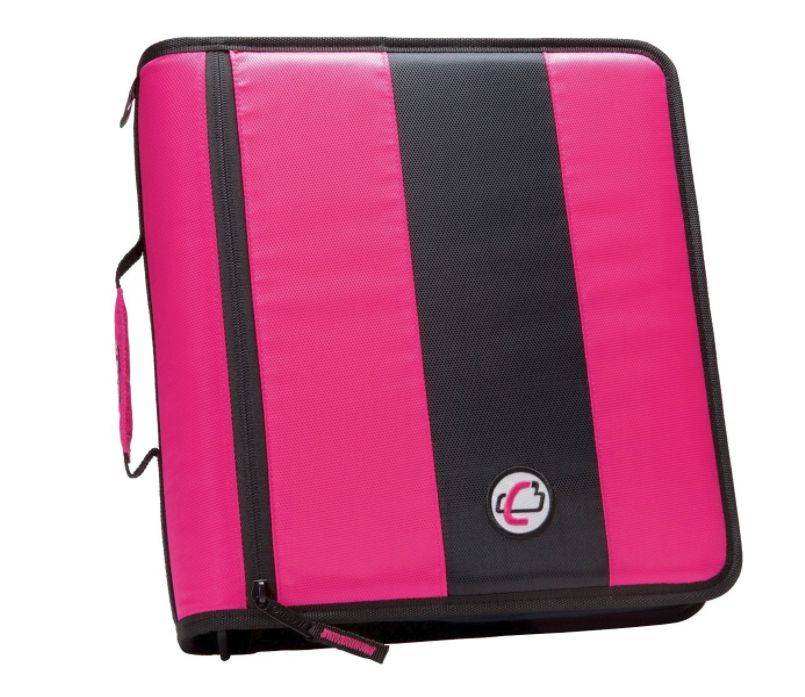
How to Make a Coupon Binder
- 2″ or Larger Zippered Binder
- Plastic Pocket Tab Dividers
- Plastic Trading Card Sleeves to hold your newspaper insert coupons
- 3 Pocket Page Protectors – My Favorite for Holding Internet Coupons.
- Sharpie Marker
- Print out the Table of Contents Pages from the Downloads Page. This will give you a good start for which categories you need and how to organize your binder
- Label your Dividers with the Main Categories
- Label Plastic Sleeves with Sub Gategories
- Use the Content Pages behind each Divider
- Clip Your Coupons and Insert on the Correct Pages

How to Make a Coupon Box:
Another Great Organization Method is the Coupon Box. This works on the same principle as the Category Binder System. You just use tab dividers to keep coupons organized and easy to find. I really love this Photo Storage Box from Amazon.com!
Here’s what you would need to create a coupon box:
Use the Coupon Categories Checklist as a guide line to label your dividers. This should help you cover all areas of the store. File Coupons in the correct category and you’re ready to go! You can also use an alphabetical system which is what I use. I’ve got more information on my personal system below.

How to Organize Coupon Inserts:
The Clip-less Insert Method is another great way to stay organized and not have to spend any time clipping coupons. I recommend something like this File Folder Storage Box from Amazon.
Here’s what you will need:
- File Folder Storage Box or File Cabinet
- Folders
- Sharpie Marker
Label a Folder Each Sunday when you get your Newspaper coupons with that Sunday’s Date. You want your coupons labeled by the Date they were in the Paper because that’s how you’re going to be able to find them quickly.
You just Label the Folder and put the Coupons in the Folder each Sunday. When you need a specific Coupon for a Deal then you can quickly go to the Date the Coupon was in the insert and find the coupon you are looking for. For more information on how to understand Insert Coupons Check out this post.
My Current Organization System:
I am often asked how I personally organize my coupons. I have always used a combination of Organization Methods. Until recently I was a “Binder Girl” I had Categories and tried to keep most coupons that I would use with me at all times. Recently I switched to the My Coupon Keeper System and it’s been awesome! I actually have my coupons organized alphabetically which is so much faster to me when I’m in a store or filing them at home. All I have to think is Oh Campbell’s Soup. File it in “C” and then when I’m in the store if I see a sale on Campbell’s Soup I can grab the coupons in “C” and flip through them. It’s such a time saver for me.
I also use the Clip-less system meaning that I don’t clip every coupon. I only cut out what I know I will use and then I file everything else. Then if a Hot Sale comes up at Walgreens I can grab the coupons I need quickly. This combination has been working well for me, but I would love to know how you organize your coupons and what works for you! Leave a comment and let me know.
WATCH THIS VIDEO: How to Organize Coupon Inserts
The Best Stores for Couponing
If you are wondering what The Best Stores for Couponing are I have 3 favorite stores, but I also want you to think about what’s close to you. I recommend you start with one store and slowly learn how to coupon at that store, then move on to another store as you get more and more comfortable. The idea is that if you jump into too many stores at once you will get overwhelmed and eventually give up. Starting slowly with only one store is the easiest way to be a successful couponer!
My Favorite stores for using coupons include Target, CVS, & Walmart! You can click on the images below to see all the best deals at each store!


All 3 of these stores have really easy to follow coupon policies and also BIG Savings! Target and CVS are probably my favorites for beginners because there aren’t too many rules and also they have the best deals each week. Walmart is a great choice because so many people have one near them and they have a coupon friendly policy!

The Best Coupon Apps
There are a lot of great apps out there and I’m sure you are wondering which ones are The Best Coupon Apps and which ones will save you the most money! I have a lot of different apps on my phone but I tend to stick to just a few for couponing because it can be complicated to keep up with too many especially when you are first learning how to coupon.
Here are my 3 Favorite Coupon Apps:
1.) Ibotta
This is the most popular app for saving money, they have new offers every week and month on hundreds of items. You just have to complete a simple activity to unlock each rebate, then purchase the selected items, scan in your receipt and you will get cash back added to your account. When you reach $20 you can redeem your cashback for Paypal cash, Amazon gift cards, Starbucks gift cards and more!
2.) Checkout 51
Checkout 51 is similar to Ibotta in that you get Cash Back for making specific purchases. They also typically have a limit of more than one per offer. New offers come out every Thursday and typically they expire on Wednesday Night at Midnight, that’s important to keep in mind when redeeming your receipts, you’ll want to scan in your receipts before the offers expire or reach their limit.
3.) SavingStar
SavingStar is a little different, you can add your store loyalty cards to your account, then load offers onto your card. When you make a purchase at the store you’ll automatically get the rebate or coupon amount added to your account. You don’t have to remember to scan in your receipt at most stores.
Click the links above to download each of these apps and create an account to start saving!
How to Get Sunday Coupon Inserts for Free
Every week there are coupons in the local Sunday Newspaper. We call these “Sunday Coupon Inserts” These coupons can vary by region so if you don’t see a coupon that we have listed in your local inserts it may be a regional variation.
If you would like additional copies of the Sunday Coupon Inserts you can buy additional newspapers each week at your local gas station. I typically recommend one copy of the newspaper for every member of your family. If you have 4 people in your family you don’t really need more than 4 copies or 4 of most items at a time! If you have more people you may want additional papers, but keep in mind that most coupons have a limit of 2 or 4 so I normally don’t purchase more than 4 copies of the paper.
You can get additional Sunday Coupon Inserts for Free by asking local family members or neighbors to save their coupon inserts for you. I have both my mother in law and my grandmother save me coupons each week so that I don’t have to pay for additional copies of the paper!
How to Use Digital Coupons
Digital Coupons are becoming more and more common! We are starting to see digital coupons for just about every store and also digital coupons showing up from Manufacturers. I was at a recent P&G Event where they told us that their goal is to be completely digital in the next 5 years so if you aren’t familiar with how these work then it’s time to not only learn how to coupon, but also how digital coupons work :)
Digital Coupons are typically loaded directly to your store loyalty card or app from a website or app. Stores like Target, CVS, & Walgreens all have Manufacturer Coupons located in their apps, these can be loaded to your account by clicking a button and they are applied automatically at checkout.
Here’s a step by step guide to using digital coupons:
1.) Download The Apps for your Favorite Stores (Kroger, Safeway, Target, CVS and more!)
2.) Log In to the App and add your Membership or Loyalty Card Number
3.) Search through the app for coupons you want to use at checkout and click the “Add” Button
4.) At checkout either scan the barcode in the app, or enter your phone number (This will vary slightly by store)
5.) Coupons will be applied automatically at checkout and you should see the savings come off your receipt and final price.
How to Get Coupons in the Mail
One of the best ways to get Coupons in the mail is by reaching out to your favorite companies. A lot of companies will send out coupons for their products when you contact their customer service department. There are also several other super easy ways to get coupons in the mail!
Join the Mailing List:
The easiest way to start getting coupons in the mail is by joining the mailing list! Make sure you create an account with your favorite stores, or sign up in stores with your name and mailing address. If they don’t have your mailing address they can’t send you something :) So be willing to give that information out. You may get some junk mail but if you’re signing up with a store or brand you love more than likely you’ll love the info they send out!
Email the Company:
I would reach out to the companies through their websites and contact forms, here are a few suggestions of reasons to reach out to companies:
- Let them know you love their products
- Email them asking questions about New Products You Want to Try
- Just ask for savings, some companies will send coupons because you ask!
- Tell them if you have feedback on a product (*Good or bad, but companies love to hear what you like too!)
Join the Rewards Program:
A lot of stores and brands have loyalty programs, signing up for the rewards programs, entering your birthday and shopping at the store frequently are all ways to increase your chances of getting coupons in the mail. There’s typically not one specific place you can sign up, but keeping your eyes open for these opportunities is a great way to start filling your mailbox with coupons.
How do Double Coupons Work
I get a lot of questions on how double coupons work, this isn’t something that most stores offer anymore, there are a few stores that still double coupons, and stores like Harris Teeter often run double coupon events. Basically a double coupon means you get double the value. If a coupon is valued at $0.50 then the store will also give you a $0.50 discount which means you get $1 in savings!
Most double coupon events have a limit on the number of coupons you can double and a limit on the value of the coupon (Typically up to $1 or $2)
If your store has double coupons it will be listed in the coupon policy, so double check the coupon policy for any rules or restrictions. In general it’s a good idea to read your store’s coupon policy before you start using coupons at the store.
How to Understand Coupon Lingo
If you are new to couponing then you may be confused by some of the Lingo and Abbreviations that we use here on the website. I have a FREE Printable Download Lingo Cheat Sheet for you to help you learn how to coupon + I’m going to list some of the most common abbreviations below.
- B1G1 – Buy One Get One Free
- CRT – Cash Register Tape or Recipt
- CAT – Catalina Coupon or Register Reward
- ECB – Extra Care Bucks at CVS
- FAR – Free After Rebate
- GM – General Mills Coupon Insert
- IP – Internet Printable Coupon
- IVC – Instant Value Coupon from Walgreens
- MFR – Manufacturer
- MIR – Mail In Rebate
- OOP – Out of Pocket
- OYNO – On Your Next Order
- PG – Procter & Gamble Insert
- RP – Red Plum Insert or Coupon
- RR – Register Rewards at Walgreens
- SS – Smart Source Coupon Insert or Coupon
- UPC – Barcode Number
- YMMV – Your Milage May Vary
- WYB – When You Buy
Learn MORE about How to Use Coupons
- How to Get Cash Back on Groceries with Checkout 51
- 8 Ways to get Free Coupons for Diapers and Formula
- Understanding B1G1 Free Coupons
- Target Gift Cards – How to save with gift card deals at Target
Are you new to couponing? Take our FREE 15 Minute Online Coupon Class and learn how to save money, use coupons, and get amazing deals at the grocery stores and drugstores!